Every little Mac tool, one shortcut away.
Satchel is a tool roll for your Mac: 35 small, native tools in eight pockets. Press ⌃⌥Space in any app, type “gif”, “shrink pdf” or “ocr”, and press Return. Results go into a new folder, and your originals stay exactly as they were.
Pay once · macOS 14+ · Apple silicon & Intel · No FFmpeg, nothing else to install · Already bought? Download Satchel
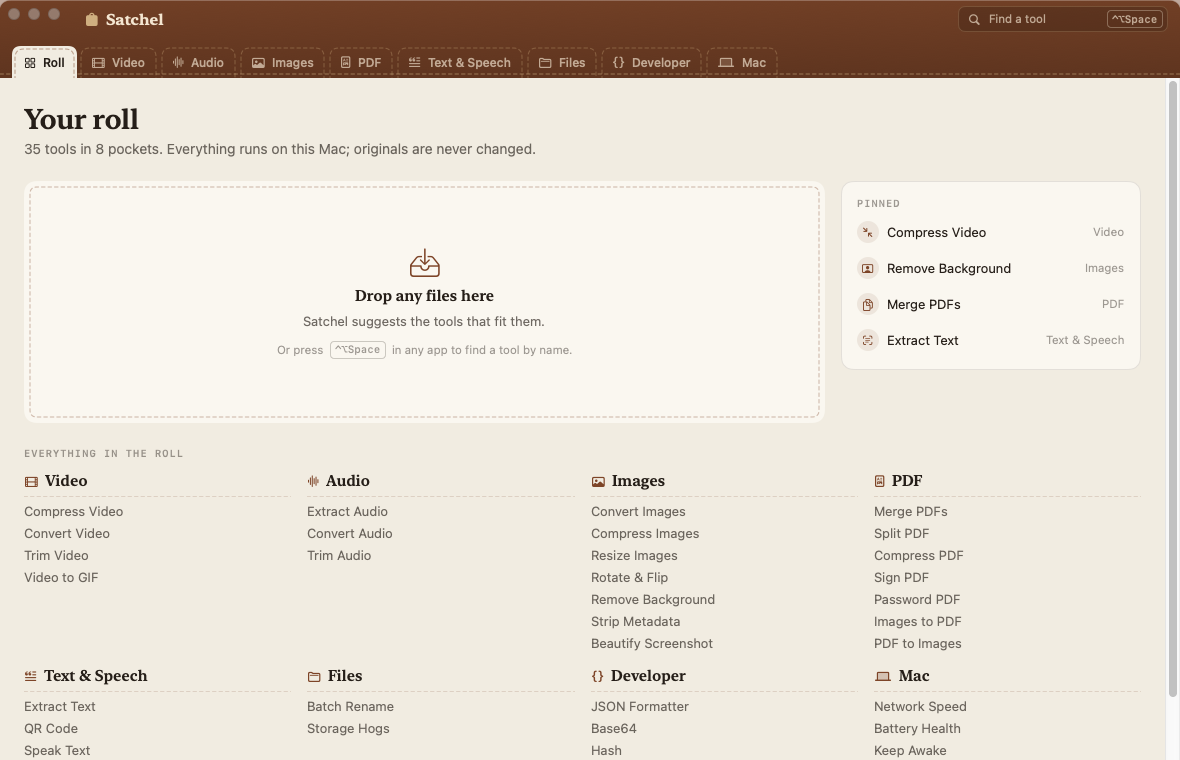
A working model, not a video — sample data. Compress Video, Remove Background and Merge PDFs are simulated with sample files; JSON Formatter and QR Code really work, right in this page. Nothing is uploaded. In the real app the command bar opens over any app with ⌃⌥Space.
- Pay once, no subscription
- No account
- Originals never change
- No FFmpeg or Homebrew
- Native on Apple silicon & Intel
- 14-day refund
35 tools. Eight pockets.
Pick a pocket to see what’s in it. Tools marked “Try it” open in the working model above.
- Compress VideoMake clips small enough to send, without the blockiness.VideoTry it
- Convert VideoSwitch between MP4 and MOV, or drop the soundtrack.Video
- Trim VideoCut a clip down to the part that matters.Video
- Video to GIFTurn a moment of a clip into a looping GIF.Video
- Extract AudioPull the soundtrack out of a video.Audio
- Convert AudioM4A, lossless ALAC, WAV, AIFF or CAF.Audio
- Trim AudioKeep just the part you need, with a gentle fade.Audio
- Convert ImagesHEIC, PNG, JPEG, TIFF — whichever the other end wants.Images
- Compress ImagesSmaller photos for upload limits and inboxes.Images
- Resize ImagesScale to an exact width, longest side or percentage.Images
- Rotate & FlipTurn sideways photos upright, or mirror them.Images
- Remove BackgroundLift the subject out onto transparency.ImagesTry it
- Strip MetadataRemove location, camera and date details before you share.Images
- Beautify ScreenshotRounded corners, a soft shadow and a calm backdrop.Images
- Merge PDFsJoin several PDFs into one, in the order you set.PDFTry it
- Split PDFBreak a PDF into pages or page ranges.PDF
- Compress PDFShrink scans and photo-heavy PDFs.PDF
- Sign PDFAdd your signature and the date to a page.PDF
- Password PDFLock a PDF with a password, or unlock one you own.PDF
- Images to PDFBind photos and scans into one tidy PDF.PDF
- PDF to ImagesSave every page as a PNG or JPEG.PDF
- Extract TextRead the words in photos, screenshots and scanned PDFs.Text & Speech
- QR CodeMake a QR code from a link, or read one from an image.Text & SpeechTry it
- Speak TextTurn writing into a spoken audio file.Text & Speech
- TranscribeTurn recordings into text or subtitles, on this Mac.Text & Speech
- Batch RenameRename a pile of files with a pattern and numbers.Files
- Storage HogsFind the biggest files in a folder and move them to the Trash.Files
- JSON FormatterPretty-print, minify and validate JSON.DeveloperTry it
- Base64Encode and decode text or files.Developer
- HashMD5, SHA-1, SHA-256 and SHA-512 of text or a file.Developer
- UUIDFresh random UUIDs, as many as you need.Developer
- Colour PickerPick any colour on screen; copy it as HEX, RGB or HSL.Developer
- Network SpeedDownload, upload and responsiveness, using Apple’s own test.Mac
- Battery HealthCapacity, cycle count and condition at a glance.Mac
- Keep AwakeStop the Mac sleeping for a while.Mac
One job, one quiet screen.
Satchel is the quick, one-shot toolbox. Every tool is built on Apple’s own frameworks — AVFoundation, Vision, PDFKit and ImageIO — so there’s nothing else to install.
One shortcut, every tool
⌃⌥Space opens a command bar from any app. It understands names, verbs, formats and typos: “colr”, “mp4” and “subtitles” all find the right tool.
A focused screen per tool
Each tool shows only its own settings, with sensible defaults. Drop files in and press ⌘↩.
Originals never change
Results go into a dated folder in Downloads › Satchel, or next to the originals if you prefer. A failed or stopped run leaves nothing behind.
Video without FFmpeg
Compress clips to a real target size in H.264 or HEVC, convert between MP4 and MOV, mute them, trim on a filmstrip with a live frame, or turn a moment into a GIF.
Images done properly
Convert, compress to a quality or a file size, resize, rotate and flip, remove the background with Apple’s Vision, strip location and camera details, and frame screenshots on a calm backdrop.
PDFs in a minute
Merge in the order you set, split by ranges, compress scans, sign with a handwriting face and the date, add or remove a password, and convert between images and PDF.
Read, speak, scan
Pull text out of photos and scanned PDFs, make and read QR codes (Wi-Fi join codes too), save writing as spoken audio, and transcribe recordings to text or SRT subtitles.
Batch Rename you can trust
See every new name before anything changes. You get renamed copies by default, or rename the files themselves with one-click Undo.
Developer drawer
An order-preserving JSON formatter that points to the line and column of an error, Base64, MD5 and SHA hashes with checksum matching, UUIDs, and a screen colour picker with WCAG contrast.
Mac check-ups
Run Apple’s own network test, read battery health and cycle count, find the biggest files in a folder (they only ever go to the Trash), and keep the Mac awake for a while.
Weighing up all-in-one toolboxes? Read the guide: the best all-in-one toolbox apps for Mac
Type what you want. Press Return.
Press ⌃⌥Space in any app (or ⌘K inside Satchel). Your recent and pinned tools wait at the top; type a few letters and the right one comes first. Return opens it.
Or skip the typing: drop a mixed pile of files onto the roll and Satchel lists only the tools that can take every one of them. The global shortcut needs no Accessibility permission, and you can switch it to ⌥Space or ⇧⌘K in Settings.

When one job becomes your daily work.
Satchel does one quick job well. If you live in one of these jobs every day, the dedicated app is worth it.
Saddle leather, paper and brass.
Screenshots straight from Satchel, with sample files. Flip between light and dark.


What stays. What connects.
Online toolboxes want your files. Satchel works on them where they are.
Stays on your Mac
Every file, every result, every run.
- ✓The files you drop inRead where they are, and never modified
- ✓The resultsA new folder in Downloads › Satchel, or beside the originals
- ✓The work itselfAVFoundation, Vision, PDFKit, ImageIO and macOS’s own tools
- ✓Your pins and recent toolsKept in Satchel’s settings. No analytics or tracking
Connects
Small requests, over HTTPS.
- 1License checkYour key and an activation ID, to Dodo Payments
- 2Update checkApp name and version, to
satchel.newmac.app - 3Network Speed, when you run itApple’s
networkQualitytest, to Apple’s test servers - 4Transcribe, only if neededFor a language your Mac can’t recognise on-device, macOS’s speech recognition may use Apple’s servers
The full list, for every app, is in the privacy policy.
Pay once. Keep it.
One payment, no subscription. Choose how many Macs you’ll use Satchel on.
3 Macs
For your home and work Macs
Checkout opens soon. The buttons above go live here the moment it does.
Every plan includes
- One payment, no subscriptionAll 35 tools, yours to keep.
- License key by emailSent the moment you pay. Activate in one click.
- Move between MacsUse “Deactivate this Mac”, then activate on the new one.
- Free updatesNew versions install themselves.
- 14-day refundNot for you? Read the refund policy.
- macOS 14 or laterNative on Apple silicon & Intel.
Already bought? Download Satchel · .zip · Install help
Questions, answered.
Does anything leave my Mac?
Your files don’t. Every tool runs on your Mac with Apple’s frameworks (AVFoundation, Vision, PDFKit, ImageIO) and built-in tools (afconvert, say, textutil, networkQuality). Satchel connects to the internet to check your license, to look for updates, and when you run Network Speed (Apple’s test servers). Transcribe asks macOS to recognise speech on your Mac; for a language your Mac can’t do on-device, Apple’s speech recognition may process the audio on Apple’s servers, as dictation does.
Which permissions does it ask for?
None at launch. The global shortcut needs no Accessibility permission. macOS may ask once before Satchel saves results into Downloads, or reads files you drop in from Desktop or Documents. Transcribe asks for Speech Recognition the first time you use it. Colour Picker uses the system eyedropper.
Will it change or delete my files?
Your originals are never modified: results always go somewhere new. The two exceptions are clearly labelled. Batch Rename’s “Rename the originals” option renames the files themselves, with Undo. Storage Hogs moves the files you tick to the Trash after asking you, and you can put them back from there.
Why not use FFmpeg?
Apple’s own encoders are fast, hardware-accelerated and already on your Mac, so there’s nothing to install. The trade-off is fewer exotic formats. Satchel reads what macOS can play (MP4, MOV, M4V, most MP3, AAC, WAV, AIFF and FLAC audio) and writes MP4, MOV, GIF, M4A, ALAC, WAV, AIFF and CAF. It can’t make MP3, WebM or MKV.
Does it download videos from websites?
No, by design. Satchel works on files you already have.
How is it different from Transmute, Folio, Utter or DevSweep?
Satchel does one quick job well. Transmute is the deeper converter with recipes and a Drop Dock. Folio edits PDFs page by page. Utter is system-wide dictation. DevSweep cleans developer caches and toolchains safely. If you live in one of those jobs every day, the dedicated app is worth it.
What doesn’t it do?
It has no cloud features, no AI summaries or translation, no screen recording, and doesn’t edit video on a timeline beyond trimming. Background removal works best on a clear subject such as a person, pet or product. Transcription quality depends on the languages macOS supports on your Mac.
macOS says it can’t verify the developer.
Satchel is distributed directly from this website. Here’s how to open it the first time.
Is there a free trial?
No. Use the working model at the top of this page to see exactly how Satchel works: the JSON Formatter and QR Code tools in it really run. If it turns out not to be for you, you can ask for a refund within 14 days — see the refund policy.
Can I use Satchel on more than one Mac?
Yes. The 3-Mac and 5-Mac plans cover several Macs with one license key. Any license can move to a new Mac: choose “Deactivate this Mac” in Satchel on the old one, then activate on the new one.

Stop hunting for one-off websites.
Thirty-five tools, one shortcut, nothing uploaded.